


Song Snooper Help Page
Current Version
Song Snooper 1.0.0.0
(release date 04/14/10)


Song Snooper is a completely FREE universal AUDIO downloader. Song Snooper (SSN) not only downloads songs from audio sites, but it also extracts and downloads the audio from videos found on sites like YouTube. We estimate that SSN can detect, extract, and download audio from approximately 90% of all internet sites that contain Song. SSN is a windows only product.
Song Snooper is the lite version of our shareware product called Song Surgeon. Song Surgeon enables you to modify the playback of Songs by slowing them down, changing the pitch, setting loop points, converting between file types, and much more. To learn more about Song Surgeon click here.
This HELP page provides a short Video tutorial on the use of Song Snooper as well as written instructions:
Below is a picture of the Song Snooper user interface. It is easy to use. After you have opened Song Snooper, open the browser of your choice and begin to browse websites and play Video or Songs (a list can be found on the Song Snooper main page). As you navigate to a page and begin to play auido or video, Song Snooper (SSN) will detect the file playing, find the URL, and put a summary of this link into the main GUI as shown below. In many cases, SSN allows you to preview these audio files; this is especially helpful if you have several links in the window and are not sure which link is for which files. Song. From this main screen you select the Song you want to download and click the download button.
A brief explanation is provided for the main functions and features found in this product.
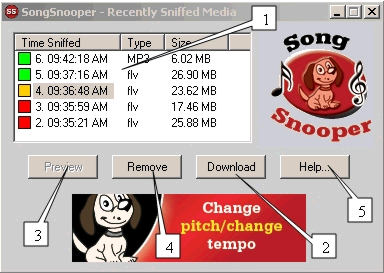
This areas is referred to as the 'sniffer window'. It contains information about each link that is sniffed or detected, including the time the file was found, the file type, and the file size.
You will also note the color-coded box next to each link. The red color means the file has NOT been downloaded. Orange means it is in the process of being downloaded. Green means that it has already been downloaded.
The download button opens a Windows dialog, allows you to name the file, and allows you to specify the location of the file that is to be downloaded. Once you have done this and clicked 'save' from the diolog, the file begins to download.
Preview allows you to preview MANY of the audio files that appear in the sniffer window. This preview function does not work on all sites - Youtube is one such exception.
The Remove button will remove or delete the Song from the sniffer window.
The Help button takes you to THIS help page.
Q1. Since Song Snooper finds or detects about 90% of all audio or video URL's, how do I know if Song Snooper is working correctly when I play an audio or video file and SSN does not find a link for it?
A1. There are three possible explanations as to why Song Snooper cannot find a link.
- There are certain types of coding on web pages that disable SSN's ability to find a link. Generally speaking, if you start an audio or video file playing and SSN does not locate a link and pop it into the 'sniffer window' within 10-15 seconds, you can safely assume that SSN cannot find that link. This assumes that items #2 and #3 below have been checked.
- SSN detects network activity. If you have previously played an audio or video file to completion on your computer in your browser ' and then returned to the same webpage and played it again, SSN will NOT detect this link. That is because this file has been cached by your browser and is actually playing from your hard drive; it is not being played (downloaded) from the web page. If you clear your browser cache, SSN will again be able to detect this A/V file.
- When you install SSN, the installer prompts you to install a program called WinPcap as part of the installation. If you did not allow WinPcap to install or this part of the installation failed, SSN will be unable to detect any links. You can check this by going to your start button and then your program files listing and checking for WinPcap. If you do not see it listed, then you should manually download and install it. You can find the link to Winpcap 4.1.1 http://www.winpcap.org/install/bin/WinPcap_4_1_1.exe
If you have questions, suggestions or need additional help, please email us at: songsnooper@songsurgeon.com.
We do not provide any official support for Song Snooper since it is a free product, but we do read the emails sent to this address, and as time permits, we will try to get back to you.